









Speed Matters Most
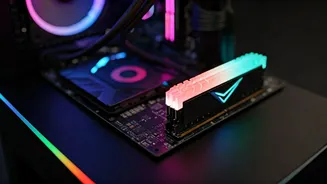
The performance of a gaming setup in India heavily relies on the speed of its components. Central to this is the Random Access Memory (RAM). Think of RAM as
the short-term memory of your computer, directly impacting how quickly your games load and respond. Insufficient or slow RAM can cause frustrating lag and stuttering, ruining the enjoyment of even the most graphically stunning games. The quantity of RAM also plays a crucial role. A minimum of 8GB is often considered the baseline, but 16GB is highly recommended for a smoother experience, especially when playing modern games. High-end gamers and those who multitask heavily might even consider 32GB for optimal performance. The RAM's speed, measured in megahertz (MHz), is another vital factor. Faster RAM allows the processor to access data more rapidly, leading to smoother gameplay and quicker loading times. Choosing RAM with a high MHz rating can make a noticeable difference in performance.
SSDs: The Game Changer
Solid State Drives (SSDs) have revolutionized the gaming experience by drastically reducing load times and improving overall responsiveness. Unlike traditional Hard Disk Drives (HDDs), SSDs use flash memory, providing significantly faster data access. This difference is immediately noticeable when loading games, maps, and textures. When the game loads, an SSD can reduce loading times from minutes to seconds, allowing players to jump into action without delay. Beyond faster load times, SSDs also contribute to smoother gameplay by reducing instances of stuttering and providing a more stable frame rate. This is because the game can access data more quickly, preventing bottlenecks and maintaining consistent performance. Even the operating system benefits greatly, with faster boot times and a more responsive user interface. For gamers in India, investing in an SSD is one of the most effective upgrades to enhance their gaming setup and overall computing experience.
RAM & SSD Synergy
Optimizing a gaming PC involves the intelligent combination of fast RAM and a high-performance SSD. These components work together to provide a seamless gaming experience. When the game loads, data is initially pulled from the SSD, which stores the game files. The operating system then loads crucial game data into the RAM, allowing the CPU to quickly access it. The faster the RAM, the quicker the CPU can retrieve the necessary information, resulting in quicker processing and smoother in-game performance. A powerful SSD ensures the game loads quickly and reduces stuttering, while sufficient and fast RAM ensures the game runs smoothly, with minimal interruptions. The combined effect provides a lag-free, responsive gaming session. The best approach is to allocate a significant portion of your budget to these two components. This ensures that the overall performance is balanced and able to handle graphically demanding games.
Making Informed Choices
When selecting RAM and SSDs for gaming in India, several factors should be considered. Start by checking the motherboard's specifications to determine the supported RAM type and speed. Ensure the selected RAM is compatible with the motherboard. Choosing RAM with a high MHz rating is beneficial, as it allows for quicker data access. Also, consider the storage capacity you require. Modern games can be large, so a 500GB SSD might fill up rapidly. Aim for at least a 1TB SSD to accommodate the operating system, games, and other software. The type of SSD matters too; NVMe SSDs, which connect directly to the motherboard via the PCIe interface, offer significantly faster speeds than SATA SSDs. When buying, read reviews and compare prices from different retailers to find the best deals. Checking the prices from local stores and online e-commerce platforms ensures a well-informed decision.
Maintenance Matters
While choosing the right components is essential, maintenance plays a vital role in ensuring long-term performance. Regularly updating the system's drivers, especially graphics card drivers, is crucial. These updates often include optimizations for new games, leading to performance improvements and bug fixes. Regularly defragmenting the hard drive is unnecessary with SSDs, but ensuring that the operating system and games are on the SSD can make a huge impact. Keeping the system free from unnecessary files and programs also helps maintain optimal performance. Regularly check the temperatures of the CPU and GPU to prevent overheating, which can lead to performance throttling and system instability. Consider adding extra cooling, such as fans or liquid coolers, to enhance heat dissipation. Finally, create backups to secure your game files and personal data from data loss. Proper care and maintenance will ensure that your gaming setup remains in top condition.