





Start with Your Creative Vision
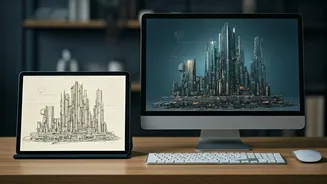
Before you touch any AI tool, the process begins where it always has: with your idea. Generative AI is a powerful amplifier, not a replacement for creativity. Your initial concept art—whether it’s a rough digital sketch, a detailed pencil drawing, or even
a well-curated mood board—serves as the essential foundation. This human-made starting point provides the soul, the composition, and the core emotional intent of the piece. The goal isn't to have the AI create from a blank slate, but to have it build upon your unique vision. Think of your concept as the blueprint and the AI as the world’s fastest and most versatile construction crew, ready to build out your design based on your explicit instructions.
Choose Your AI Co-Pilot
The generative AI landscape is bustling with tools, each with its own strengths. You don’t need to master them all; you just need to understand the basic types. Text-to-image models (like Midjourney or DALL-E 3) are excellent for exploring broad themes and styles from a written description. Image-to-image models (a feature in Stable Diffusion and other platforms) are where the real magic for concept artists happens. These tools take your original sketch or a base image and reinterpret it based on your text prompts. This allows you to maintain your original composition while experimenting with color palettes, lighting schemes, textures, and character details. The key is to see these tools not as final renderers but as tireless creative assistants.
Master the Art of the Prompt
Learning to 'speak' to an AI is the most critical new skill in this workflow. A prompt is more than just a simple command; it's a detailed set of director's notes. Be specific. Instead of just “a fantasy castle,” try “a gothic revival castle perched on a cliff, cinematic lighting, volumetric fog, moody, dusk, photorealistic, 8K.” Combine artistic styles (“in the style of Hudson River School painting”), camera language (“wide-angle shot, shallow depth of field”), and material qualities (“worn leather, polished chrome”). This is how you guide the AI from a generic interpretation to something that aligns with your specific intent. Save and catalog your successful prompts; they are valuable recipes you can reuse and adapt for future projects.
Iterate Rapidly and Refine with Precision
One of the biggest workflow revolutions is the power of rapid iteration. Instead of spending hours rendering one high-fidelity option for a client, you can generate four, six, or even ten distinct variations in minutes. This allows you to explore different creative directions without a massive time investment. Once you have a base image you like, use features like 'inpainting' and 'outpainting.' Inpainting lets you select a specific part of an image—like a character’s face or a piece of armor—and regenerate just that area with a new prompt. Outpainting allows you to extend the canvas, letting the AI imagine what exists beyond the original frame. This gives you surgical control to fix errors and refine details without starting over, dramatically speeding up the revision process.
The Final Polish: Reintroducing the Artist's Hand
An AI-generated image is rarely the final deliverable. The most effective workflow involves using the AI output as a highly detailed base layer. Bring the generated visual back into your preferred software, like Photoshop, Procreate, or Clip Studio Paint. This is where you reassert your artistic signature. You can paint over certain areas to add your personal brushwork, adjust colors and levels for perfect mood, composite elements from different AI generations, and clean up any strange artifacts the model might have produced. This hybrid approach combines the speed and exploratory power of AI with the irreplaceable nuance and skill of a human artist. The end result isn't an 'AI image'; it's your image, created with a powerful new tool.
Enhance Client Communication and Approvals
Ultimately, this new workflow is a powerful client management tool. Instead of presenting a single, time-intensive concept and hoping for the best, you can now present several high-quality visual directions. This gives the client a clearer sense of the possibilities and empowers them to give more specific, actionable feedback. Asking “Do you prefer the lighting in A or the mood in C?” is a much more productive conversation than defending a single creative choice. By showing, not just telling, you reduce misunderstandings, shorten revision cycles, and get to an approved final design faster and with less friction.