







iPhone Blocked List
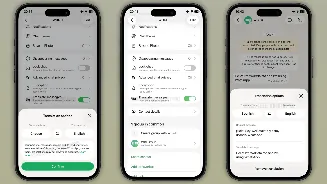
For iPhone users seeking to manage their blocked contacts on WhatsApp, the process is straightforward and accessible through the app's settings. Begin
by opening the WhatsApp application on your device. Once the app is active, navigate to your profile settings by tapping the profile icon, typically located in the bottom right corner of your screen. Within the profile menu, select the 'Privacy' option. Scrolling down within the Privacy settings, you'll find a 'Contacts' section; tap on this. Here, you will be presented with a list of all the numbers you have blocked, often displayed alongside a count of how many contacts are currently blocked. From this screen, you have the flexibility to unblock an individual by tapping on their specific number. Alternatively, you can choose to permanently remove a number from this list. It's important to note that this removal action does not unblock the contact on WhatsApp; rather, it simply makes them disappear from your blocked list, ensuring they remain inaccessible within that specific view on your device.
Android Blocked List
Android users can also efficiently check and manage their blocked contacts on WhatsApp by following a similar yet distinct set of steps. First, launch the WhatsApp application on your Android smartphone. After opening the app, locate and tap on your profile icon, which is generally situated in the top right corner of the screen. Proceed to the 'Privacy' settings by selecting it from the menu. Within the Privacy section, scroll down until you find the 'Contacts' option and tap on it. This will lead you to a screen labeled 'Blocked accounts,' clearly indicating the number of individuals you have blocked. To unblock a contact on Android, simply tap on the specific number you wish to unblock. This action will remove them from your blocked list and restore communication capabilities.
Group Chat & Status Nuances
Understanding how blocking affects group chats and status updates is crucial for a comprehensive grasp of WhatsApp privacy. Even when you block a contact, if you both happen to be members of the same WhatsApp group, you will still be able to see each other's messages within that group conversation. Therefore, it's advisable to avoid joining groups with individuals you wish to keep separate from your communication. Furthermore, if your privacy settings for 'Last Seen' and 'Online' are set to 'Everyone,' a blocked contact may still see you as online within a shared group, even though you cannot see their online status. Regarding status updates, once a number is blocked, they will not be able to view any new statuses you post. However, any statuses you shared prior to blocking them will remain visible to them for their usual 24-hour period. After that period, or if they delete your number from their phone's address book, you won't be able to view their statuses either, and vice-versa.